
With macOS Mojave Apple introduces some new privacy features. The new features are useful, but make it necessary for EasySync users to activate the new rights for Mailtastic.
The following settings only need to be made if the following points apply to you:
You use macOS Mojave?
You use EasySync Mac for Apple Mail
and or
3. You use EasySync for Outlook Mac in combination with a G Suite account
You can activate the corresponding rights for EasySync directly during installation or later. This is how it works:
First step: Grant hard disk access
Open the preferences of your Mac and select "Security"
Navigate to the tab "Privacy"
Navigate to the tab "Full access to hard disk"
Unlock the lock
Click on "+"
Add "Mailtastic" to the list
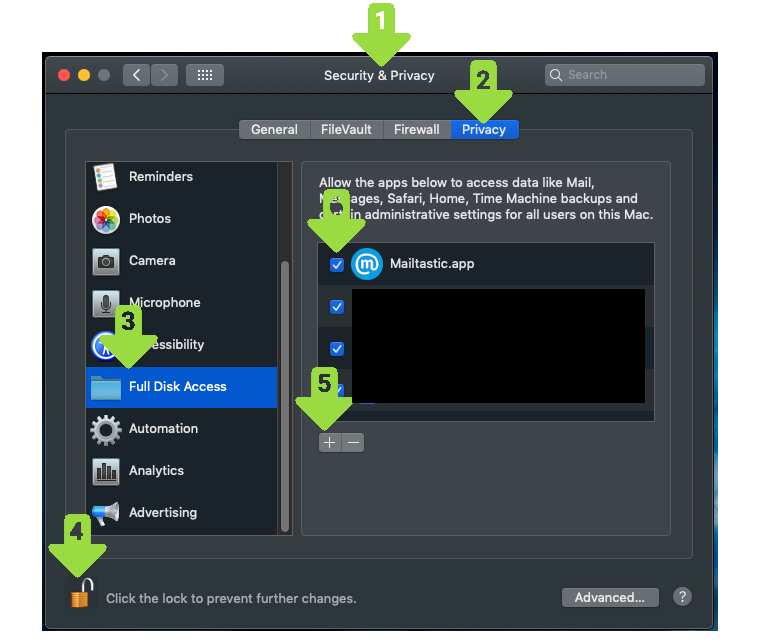
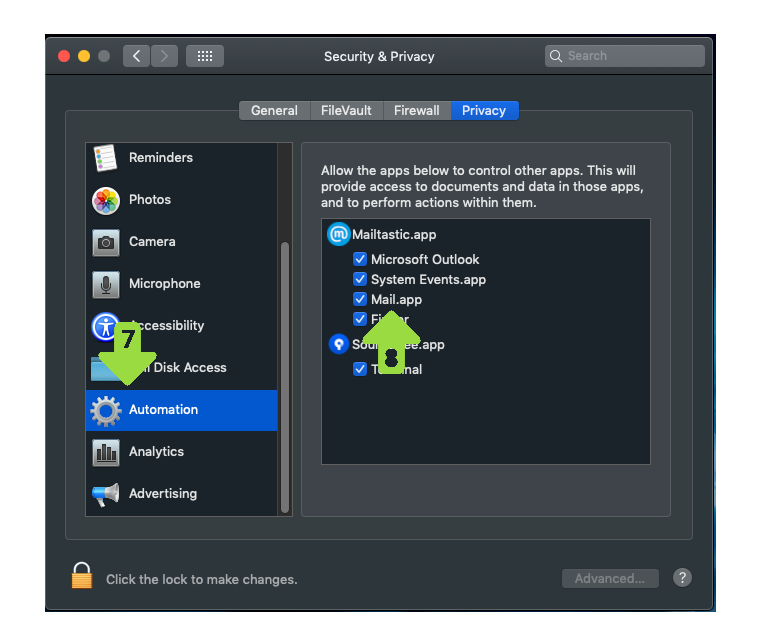
Second step: Granting automation
7. Navigate to the "Automation" tab
8. Activate "System Events" and "Mail
And done!
Do you have any questions?
No problem - we would be happy to help you personally!Simply use our free live chat (bottom right).