Do you organise your employees via Microsoft 365? Perfect! Connect your Microsoft 365 account with Signitic Coral (ex. Mailtastic) to create your Microsoft 365 users as Signitic Coralusers, keep the Signitic Coral employee data up to date and provide your employees with the right email signatures.
No installation is required to perform the Microsoft 365 - user sync. The integration can be set up in just a few steps.
Important: The user sync is one-way, i.e. employee data is only transferred from Microsoft 365 to Signitic Coral, but never the other way round. This means your Microsoft 365 employee data will not be affected by Signitic Coral in any way. It's as simple as this:
You can easily set up the Microsoft 365 integration in three steps. Below, you will find links to the corresponding instructions:
Establish the connection between your Microsoft 365 account and Signitic Coral: To the instructions
Define the basic settings of the O365 integration: To the instructions
Set up the import rules for employees and their assignment to Maitlastic departments: To the instructions
Q: Which permissions are requested from Signitic Coral to access our AD data?
A: Following permissions are needed:
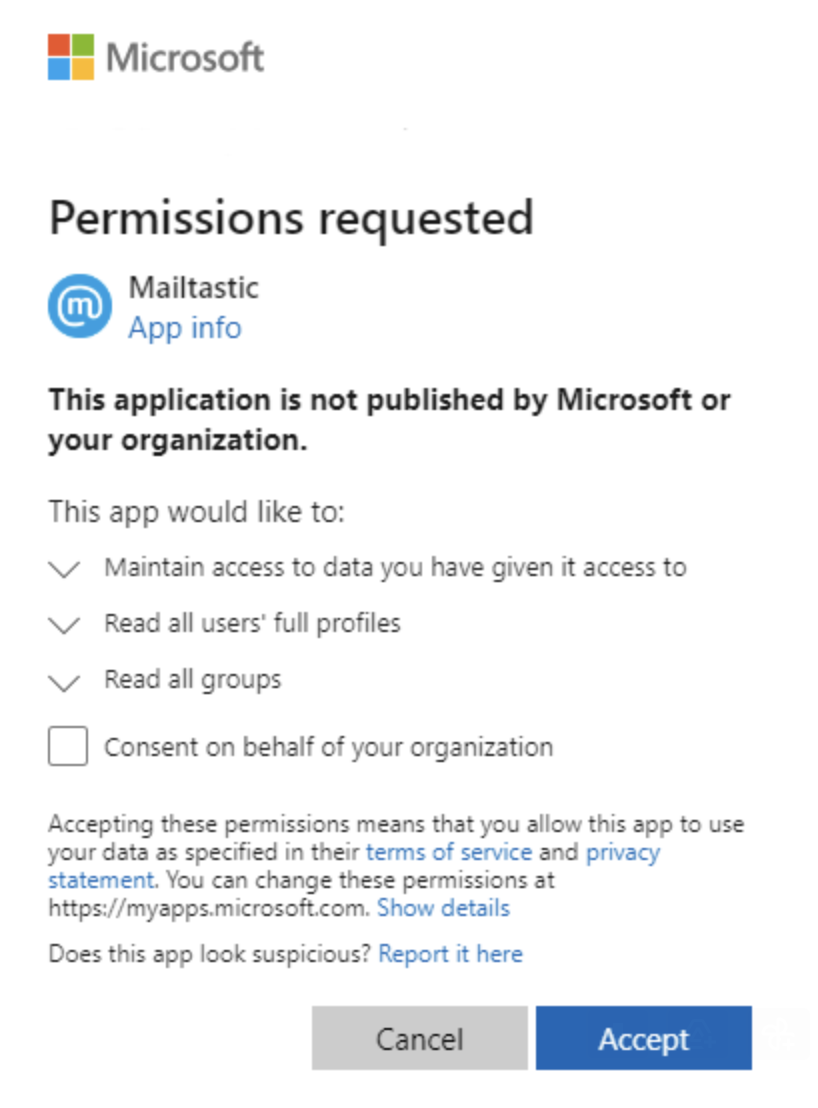
Maintain access to data you have given it access to
Allows the Signitic Coral app to see and update the data you gave it access to, even when you are not currently using the app. This does not give the app any additional permissions.
Read all users' full profiles
Allows the app to read the full set of profile properties, reports, and managers of other users in your organization, on your behalf.
Signitic Coral uses this permission to obtain users' business information needed for creating signatures for your employees
Read all groups
Allows the app to list groups, and to read their properties and all group memberships on your behalf. Also allows the app to read calendar, conversations, files, and other group content for all groups you can access.
Signitic Coral uses this permission to filter users based on AD group membership defined in case you have filtering rules based on employees' AD groups membership
This dialog will be shown to you before you establish an integration connection between the Signitic Coral app and your organization:
Q: How do the signatures get into the emails of the employees?
A: After synchronisation, your Microsoft 365 employees are available at Signitic Coral and you can decide which email signature is displayed to which employee or department. The email signatures are integrated into the signatures of the employees via the corresponding solution. For the Outlook desktop clients, for example, there is EasySync.
Q: What is synchronised?
A: Employees you manage via your Microsoft 365 account are added to Signitic Coral. Which data is transferred from Microsoft 365 to Signitic Coral, you can define in the data mapping or the import rules.
Q: When will it sync?
A: When you do a manual sync, or automatically every 24 hours at 03:00 at night (if you have auto-sync enabled).
Q: Some employees managed in Microsoft 365 were already manually created in Signitic Coral before the Microsoft 365 user sync went live. What happens when I start the Microsoft 365 user sync?
A: As long as the Signitic Coral employees created have the same email address as the corresponding Microsoft 365 users, the employees will not be imported twice.
Depending on the setting, the manually created employee data may be automatically overwritten by the employee data from O365.
Q: What settings can I make during the sync process?
A: You can decide which employees you manage with Microsoft 365 you want to add to Signitic Coral to manage their signatures.
You can decide how you want to organise employees in Signitic Coral within departments.
Q: What effect does syncing have on my Microsoft 365 account?
A: No (employee) data is changed within your Microsoft 365 account.
Q: Can the synchronisation be deactivated at any time?A: Yes. Synchronisation can be paused or permanently deactivated for individual or all users at any time.Q: Do I need to be an admin for the Microsoft 365 account to activate the O365 integration?
A: Yes. Once connected, the integration can be completed without O365 admin rights.Q: What is the cost of this service?A: There is no separate cost for the service. Your tariff is based on the number of employees you add as users to Signitic Coral. If you have activated the automatic sync, new employees will be added to Signitic Coral according to the conditions of your tariff.
Q: Do I see the automatic signature already when writing and can I adjust it?
A: Yes, you can see and adjust your signature at any time when writing each email.
Q: What happens to the synced users if I disconnect Microsoft 365 from Signitic Coral?
A: If you disconnect, you can choose to keep the users in Signitic Coral or delete them from Signitic Coral.
Q: Can I use the Microsoft 365 - Outlook on the Web integration without the Microsoft 365 - User Sync being active?
A: No.
Q: Are Microsoft 365 users also created in Signitic Coral who do not have an active Microsoft 365 licence?
A: Yes.
Do you still have questions?
No problem - we will be happy to help you personally! Simply use our free live chat (bottom right).
