
The Signitic Coral app (ex. Mailtastic) offers two different user administration settings. The Signitic Coral account owner has the option to enable one of the following two user administration settings:
Default user administration settings:
This will allow you to invite internal and external admins to your account.
Internal admin: Has access and edit permissions for all sections in the app and invite other internal and external admins.
External admin: Has access and manage permissions for all areas of the app - except the onboarding guide and deleting other internal admins.
Advanced user roles & permissions:
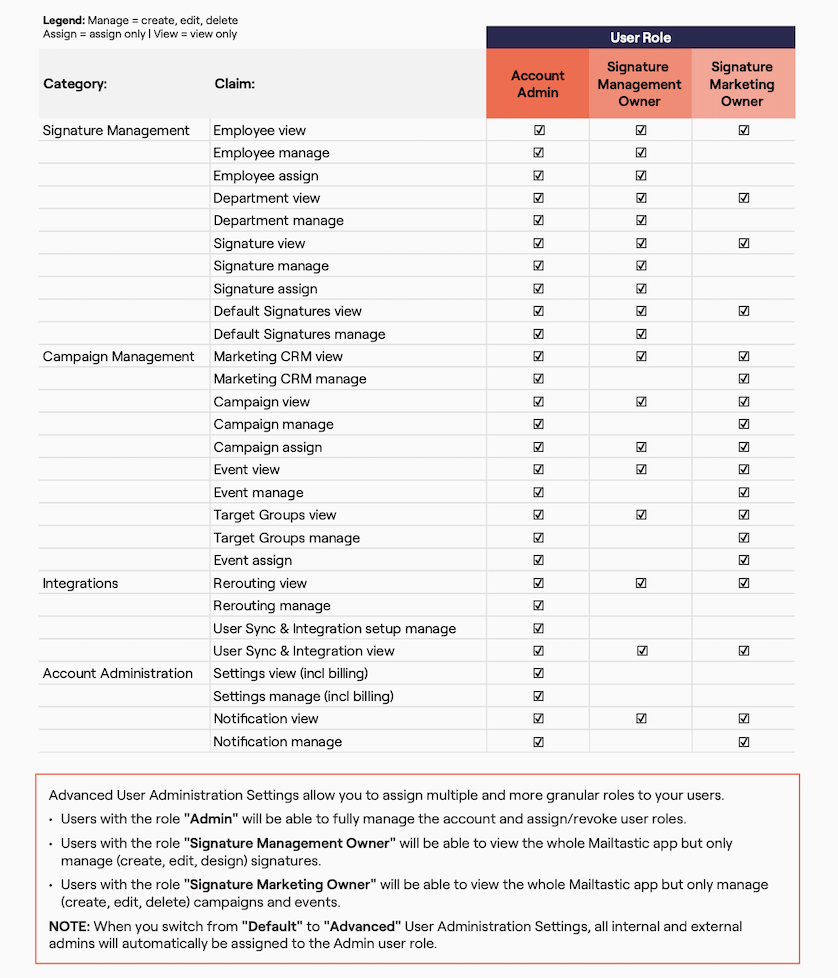
The Signitic Coral account owner can invite and assign users one or more of the following user roles:
Account admin: Can access, edit and delete all sections in the app
Signature Management Owner: Can access and edit sections that are related to managing signatures. They can only view campaigns, CRM integrations, etc.
Signature Marketing Owner: Can access and edit sections that are related to managing campaigns and Marketing CRM integrations. They can only view signatures, employees, CRM integrations, etc.
See a detailed view of all permissions for each user role in this article.
Do you still have questions?
No problem - we will be happy to help you personally! Simply use our free live chat (below right).